🚀 Introducing `@canva/create-app` CLI

:rocket: Introducing @canva/create-app CLI

We are thrilled to unveil the latest addition to our developer tools, the @canva/create-app Command line interface (CLI)! This will be your new go-to tool for rapidly setting up Canva Apps with everything you need to hit the ground running.

What is @canva/create-app?

The @canva/create-app is a CLI specifically designed to streamline the boilerplate configuration of new Canva Apps, enabling you to start your app development with Canva’s recommended environments and settings. You will no longer be required to clone our starter kit repo to get started.

:rainbow: App Templates

We’re also introducing 3 app templates! The CLI allows you to pick one of our curated templates as a starting point, to give you a little boost when building specific types of apps. It includes best practices for both app design and functionality!

:wave: Hello World template

The first template is a basic hello world app template, which serves as a minimal starting point. Whether you’re building your very first or even 20th app, this is likely going to be your new starting point.

:framed_picture: Digital Asset Management template

Our second template is for those of you building digital asset management (DAM) style apps. It lets you display users assets and containers with ease, once you implement an adaptor to transform your data into our standardised format. To learn more, refer to this tutorial!

:robot: Generative AI template

Finally, the CLI comes with a brand new generative AI template that can demonstrate best practices and incorporates our design guidelines to streamline your app development process. It’s been built with flexibility in mind, to allow you to easily tweak the template to support anything from image generation, all the way to audio and text!

Are there any other types of apps you’d like to see templates for? Let us know!

:hammer_and_wrench: How to Use

Get started in seconds with the following command:

npx @canva/create-app@latest

# or, for the CLI manual, npx @canva/create-app@latest --help

you can also run the following command to get a random development tip for working with the Apps SDK.

npx @canva/create-app@latest tip

:writing_hand: Feedback:

This CLI, although generally stable, is still in beta, so we’d love to hear your feedback before an official stable release.

Happy hacking!

4 Likes

Finally, this much-needed feature was introduced :rocket:

2 Likes

You should now run the following commands:
cd helloworldapp
npm start

Before I could run these commands I had to use CTRL + C and then accept this prompt:

Terminate batch job (Y/N)?

I wonder if that’s worth mentioning in the next steps?

Also re:

Note: HMR not enabled. To enable it, please refer to the instructions in the README.md

I’d suggest avoiding confusion with the acronym by saying:

Note: Hot Module Replacement (HMR) is not enabled. To enable it, please refer to the instructions in the README.md

Whoever built this user-friendly UI deserves a gold star! (the logo is epic)

4 Likes

Hi @chris thank you so much for your feedback and taking the time to explore our CLI!

Glad to hear you liked the UI :raised_hands: The team worked quite hard to ensure we make it look on brand and feel engaging!

Before I could run these commands I had to use CTRL + C and then accept this prompt:

This unfortunately appears to be the case on select terminals on windows OS only. We’ll continue looking into this, but I suspect the issue is in the upstream InkJS library we’re using.

I’d suggest avoiding confusion with the acronym

Great shout! we’ll include this in the next release :saluting_face:

1 Like

Thx @Anto :slightly_smiling_face:

Now that my forum account is unlocked, I’ll post some more feedback…

Minor:
When trying to manually select the text from within CMD.exe and Copy + Paste into a browser tab, I accidently included the extra “hidden characters” in the space after this URL:

https://www.canva.com/developers/apps

It results in a 404 page with this URL

https://www.canva.com/developers/apps​

Easy for me to work around, but thought I’d still let you know.

p.s. according to StackOverflow this is the left-to-right mark (LRM) a control character (an invisible formatting character)

2 Likes

@Anto I think there is a typo in “Hello World” → README.md

  1. In the “Redirect URL” text box, enter your ngrok url followed by / e.g.
    https://0000-0000.ngrok-free.app/

I believe it should say:

  1. In the “Authentication base URL” text box, enter your ngrok url followed by / e.g.
    https://0000-0000.ngrok-free.app/

:thinking:

Also, a little usability feedback:

RE instructions:

  1. Navigate to the Your apps page.
  2. Copy the ID of an app from the App ID column.

I first went looking for “App ID” on the apps “Configuration” page (i.e. https://www.canva.com/developers/app/AAGEpa9t3p0/1/configuration), before I had to refer to the README.

For some reason it didn’t occur to me to look for this identifier in the “Your apps” top level page where it lists all the apps.

Just thought you might be interested in my “first time user” intuition (incase you find other new users making the same mistake).

Once you know where to find it, it’s totally fine.

Hi @Anto

I was about to suggest a “Kitchen Sink” template that showcases all of the “App UI Kit” …but then I found @storybook/cli - Storybook :fire:

It could still be a cool idea though for all the API Reference methods to have a Kitchen Sink app (…even though the docs are fantastic!) e.g. API reference: getTemporaryUrl - Canva Apps SDK Documentation

Reading the docs is very clear, but having the option of cloning and then tinkering quickly with any of the APIs would be something that excites me & draws me in to trying more APIs that I may have not played with otherwise.

It doesn’t really fit into the “App Templates” theme… perhaps instead this could be a public Replit project (https://replit.com/)?

Providing an example app in a hosted IDE like Replit could also remove another barrier for less tech savvy people that want to hack around (but are put off by some of the pre-requisites like Terminal, Git, Node, NPM Prerequisites - Canva Apps SDK Documentation)… plus Replit has a user friendly path from Development to Deployment…and is a good tool for School / Students to get into hacking with less friction.


Update:

For fun, I tried to run the Hello World install in Replit, but ran into the following failure at about 90% through the install/setup:


Update 2:

I tried uploading the Hello World canva app source from my local to Github and then using Github as the source to create my Replit. This worked for getting the files into Replit.

But then I quickly realized that:

  1. I can’t use localhost from Replit since it’s not public (localhost:8080) and
  2. I also can’t use the replit.dev domain in the Canva app settings (e.g. https://07c9a15b-405e-4abf-9a2c-62698009a48d-00-3i46smtb3m6gb.picard.replit.dev/)

image

This field must be a valid localhost URL with port number specified or an allowed hostname

Question: what other “allowed hostnames” I could use? :face_with_monocle:

Then I tried the README instructions for ngrok (in the Generative AI template) …but that seems to only be applicable to the Backend server (localhost:3001) not the Frontend server (localhost:8080).

I assume this limitation to using localhost for the Frontend Server is to do with the use of iframes and Cross-Origin Resource Sharing? (reference: Cross-Origin Resource Sharing - Canva Apps SDK Documentation)

…or is there a way around this that I’m missing?

For example, I saw these instructions …but could only get the 2nd option (i.e. npm build) working on Replit and then upload app.js…I can’t figure how to get the 1st option (i.e. ngrok) workin for a purely Frontend app (e.g. Hello World template)

Previewing apps on mobile devices

Canva is extremely popular on mobile devices, so it’s important to preview and test your app on them. The local development server on your computer won’t be accessible via a mobile device though, so you’ll need to use either of the following workarounds:

Hello again @chris!

Firstly thanks for the detailed feedback, and for walking us through your initial experiences when using our tools and SDKs. It’s super valuable to us, and is always welcomed!

I’ll attempt to address most feedback in the above threads!

  1. I’ve updated our READMEs to fix the typos you’ve mentioned, and make it clearer that the App ID is a column in the Apps table, and will include in our next update :white_check_mark:
  2. We have Kitchen sink example apps for almost every API, which can be found here. They do require you to clone our repo, however, we have plans on bundling them into this CLI (not as templates, but rather a separate example flag/command), to prevent the need to clone the repo and make these more accessible.
  3. Replit is a great resource and tool, but as you have discovered, we currently only support localhost development URLs, which means remote dev environments such as replit and glitch aren’t supported. This is due to security concerns, and we don’t have immediate plans to relax these restrictions.
  4. There was a brief period where non-localhost URLs were accepted, and you’ve managed to find a few lingering messages and docs that still reference it. I’ve raised it with the team and we will update them shortly :raised_hands:

Once again thanks for the great feedback, and please continue to use both this thread and our forum to share feedback, and get help if needed.

Looking forward to seeing what you build :rocket:

1 Like

Hi again @Anto :slightly_smiling_face:

Thank you for your quick response and for pointing me towards the “Kitchen Sink” examples :tada:

I think it would be an excellent addition to add the “example” command in the CLI for easier discovery of these examples & for easier setup of the examples💖 .

Right now I think the only mention of these great examples is here in the docs? …and I haven’t found documentation pages on each example (it would be helpful to provide a “walk through”). The closest thing in the Docs is the awesome “Developing apps” section (but it’s a bit disconnected from the examples).

I cloned the repo and experimented with almost all the examples.

At first it wasn’t totally clear how to access/use the examples… before going in I had in my mind that the app.tsx would be a navigation landing page that provided some sort of menu with links to each example on child pages i.e. bundling everything into the one app, with each example is on a separate page with some introduction text explaining the example and any pre-conditions it may have (like selecting an image on the canvas first)…and a link to navigate back to the parent landing page.

Then I realized I had to copy + paste the files from within the /example/<example_name>/ folder into the /src/ folder (i.e. replacing app.tsx and index.tsx (and in some cases copy over /backend folder too …and maybe even a node_module or other supporting files) and then refresh the app.

This worked roughly 60% of the time :sweat_smile:, and I really enjoyed all the examples that worked - they look REALY helpful. :star_struck:

Examples of errors I’ve run into (some I figured out workarounds for … like reload the app again… or make an edit to app.tsx and save it to force the file to reload - FYI I have HMR enabled)


Example 1:

'"])}while(1);</x>//{"statusCode":403,"error":"forbidden"}

image

Workaround: reload the app via “Refresh” button in Canva


Example 2:

Compiled with problems:

ERROR in ./src/index.tsx 13:4-38
Module not found: Error: Can’t resolve ‘./app’ in ‘C:\Users\cjacob\Documents\GitHub\canva-apps-sdk-starter-kit\src’
ERROR in ./src/index.tsx 4:0-28
Module not found: Error: Can’t resolve ‘./app’ in ‘C:\Users\cjacob\Documents\GitHub\canva-apps-sdk-starter-kit\src’

Module not found: Error: Can't resolve './app' in 'C:\Users\cjacob\Documents\GitHub\canva-apps-sdk-starter-kit\src'

Workaround: Edit app.tsx file and save - causes the file to reload


Example 3:

Experienced in example: data_provider_basic

Uncaught runtime errors:
ERROR
[INTERNAL_ERROR]: No request handler configured for path: “DATA_PROVIDER_V1_REGISTER_SELECT_DATA_TABLE_HANDLER”.
CanvaError: [INTERNAL_ERROR]: No request handler configured for path: “DATA_PROVIDER_V1_REGISTER_SELECT_DATA_TABLE_HANDLER”.
at Kf.bh (https://static.canva.com/web/748e6498d340aaff.js:343:77)
at Jf.handler (https://static.canva.com/web/748e6498d340aaff.js:345:567)
at Jf.uh (https://static.canva.com/web/748e6498d340aaff.js:341:1344)

Workaround: …haven’t figured one out


Example 4:

Experienced in example: fetch

Something went wrong
To see the error, check the JavaScript Console.

image

C:\Users\cjacob\Documents\GitHub\canva-apps-sdk-starter-kit\node_modules\ts-node\src\index.ts:859
return new TSError(diagnosticText, diagnosticCodes, diagnostics);
^
TSError: ⨯ Unable to compile TypeScript:
src/backend/server.ts:4:34 - error TS2307: Cannot find module ‘…/…/…/utils/backend/base_backend/create’ or its corresponding type declarations.

4 import { createBaseServer } from “…/…/…/utils/backend/base_backend/create”;
~~~~~~~~~~~~~~~~~~~~~~~~~~~~~~~~~~~~~~~~~~~~
src/backend/server.ts:5:37 - error TS2307: Cannot find module ‘…/…/…/utils/backend/jwt_middleware’ or its corresponding type declarations.

5 import { createJwtMiddleware } from “…/…/…/utils/backend/jwt_middleware”;
~~~~~~~~~~~~~~~~~~~~~~~~~~~~~~~~~~~~~~~
src/backend/server.ts:56:32 - error TS2339: Property ‘canva’ does not exist on type ‘Request<{}, any, any, ParsedQs, Record<string, any>>’.

56 console.log(“request”, req.canva);

Workaround:

  1. In Command Prompt do CTRL + C to kill the batch process.
  2. Modify /src/backend/server.ts to change…

From:

import { createBaseServer } from "../../../utils/backend/base_backend/create";
import { createJwtMiddleware } from "../../../utils/backend/jwt_middleware";

To:

import { createBaseServer } from "../../utils/backend/base_backend/create";
import { createJwtMiddleware } from "../../utils/backend/jwt_middleware";
  1. Then restart everything again with npm run start … now the backend URL is available, the imports from utils are found, and the example works.

On a lighter note… I wanted to mention that getting “Rickrolled” in the example app_embeded_elements was a fun little easter egg :rofl:. It would be great to add similar humor to the other asset examples for images/audio/video to get a chuckle from devs exploring the API examples - spice it up a little with that signature Canva charm (…e.g. cat videos, fails, memes, jokes, confetti) :drum::confetti_ball::smile_cat:

Hi again @Anto

This morning I upgraded to 0.0.1-beta.13 and created a new app from the Generative Ai template. The success screen asked me: “Building a Digital Asset Management app?”… to which the answer is no :stuck_out_tongue_winking_eye:

If I had chose the “Digital Asset Management” template then this Tip would have been more useful to me… but given that I chose “Generative Ai” as my template, it was a bit of a confusing Tip, and made me pause for a second and wonder if I had actually chosen the correct Template :confused:

When I confirmed that I had indeed picked the correct template, I then realized that the Tip wasn’t “context” aware…and instead it was a “random tip”.

In most scenarios the Random Tip will be a welcomed piece of extra knowledge…but in this scenario there was a bit of a conflict.

Current solution:

Tip: Building a Digital Asset Management app? checkout the SearchableListView component from @canva/app-components (​https://www.npmjs.com/package/@canva/app-components​).

Possible alternative A: …change label to “Random Tip”

Random Tip: Building a Digital Asset Management app? checkout the SearchableListView component from @canva/app-components (​https://www.npmjs.com/package/@canva/app-components​).

Possible alternative B: …change copy to be more open to a context conflict

Tip: If you’re building a Digital Asset Management app, please checkout the SearchableListView component from @canva/app-components (​https://www.npmjs.com/package/@canva/app-components​).


Accessability:

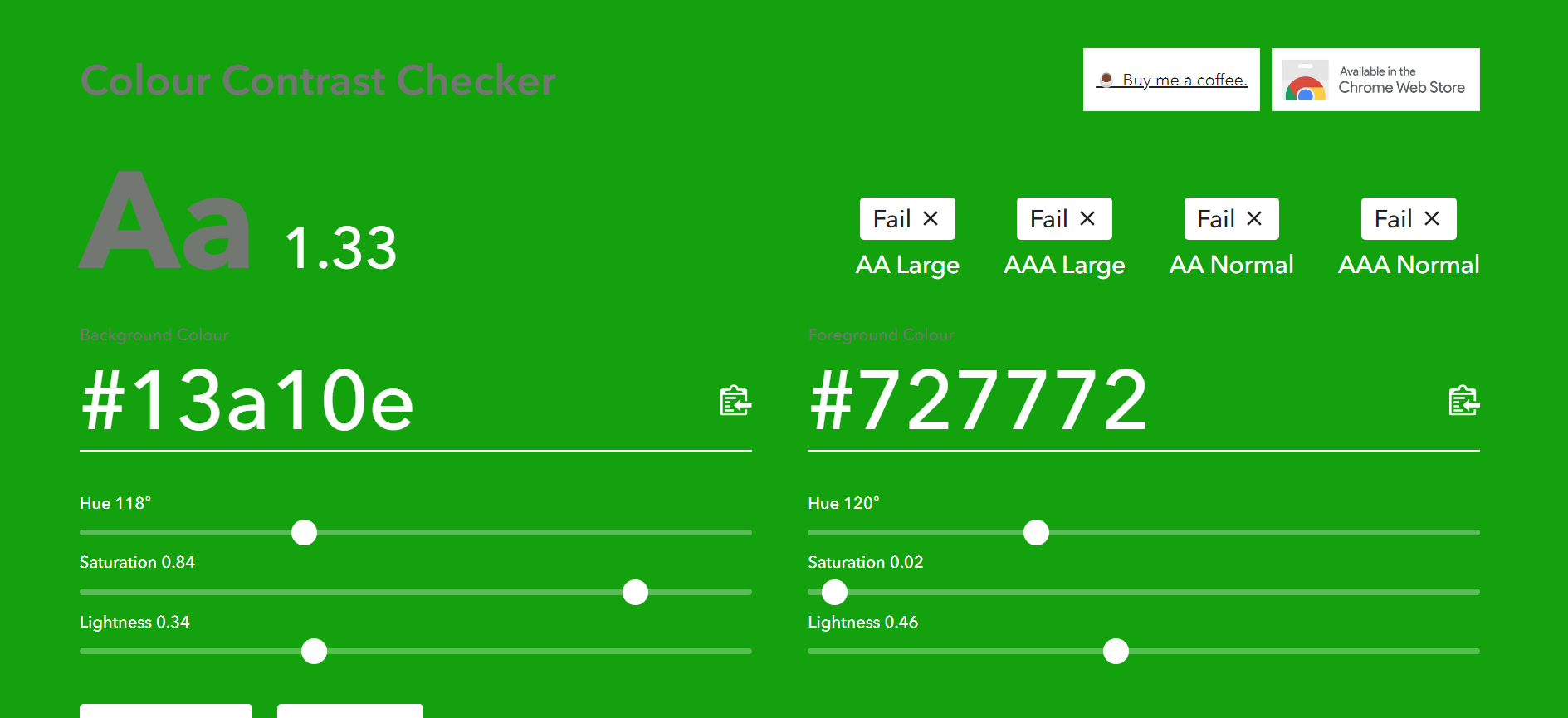
Also I’d like to suggest the “Tip” label Grey text on Green background be changed to improve accessibility:

Suggested alternative A:
Green Text, No background (however that might be confused with the terminal commands)

Suggested alternative B:
White Text, Green Background (not a full pass on accessibility, but an improvement over grey)

Suggested alternative C:
Light Blue Text, No Background (using the same blue as the Tip’s border)

1 Like

The Gen AI template is really handy. I didn’t know there’s an obscenity lib you could use to filter out prompts

2 Likes

Hi @Anto :waving_hand:,

RE:

Last week, out of the blue, I received an email from a Senior Canva Technical Sourcer about an Integrations Technical Product Manager role… I figured the fastest way to learn about what your team is up to (beyond binge watching Canva on YouTube, Canva _extend & Canva Create) would be to jump into this forum and get some hands on experience building a Canva App :nerd_face:

I noticed that the Canva App Store doesn’t currently have a “Screenshots” app… and I had recently been playing with Pikwy API for taking screenshots.

So here is what I’ve built so far as a proof of concept (p.s. please excuse any “Product Manager” code hackery :sweat_smile:).

Example Use Case

Joe Blogs is pitching his new website called “Trading View”.

He wants to visually showcase his new site displayed on different devices.

So Joe starts with Canva’s “Mockups” app to put a Desktop Monitor and an iPad into his presentation…

… however, he’s not sure how to get screenshots for these different screen sizes (e.g. he’s using Canva on his mobile device).

He searches the Canva marketplace and finds the new Pikwy app…

After install he types in his website URL (and optionally Width and Height) to capture a screenshot (he has 10 free screenshots to try out the app).

Loading…:drum:

:tada:In less than a minute he’s got his first screenshot!

Click on the image (or Drag-and-Drop) to add the screenshot to the presentation, then drag it into the Mockup.

Click “Start Over” and fill in dimensions for the iPad, then add that screenshot into the iPad mockup…and hey presto, Joe’s presentation is ready! :confetti_ball:

…But Joe also likes to tinker around, so he tests out the apps form validation, obscenity filtering, and wants to know what happens when he reaches 0 credits :eyes:…

Joe has enjoyed his experience so much, that he heads over to Pikwy’s Pricing page to signup for a 7 day free trial to unlock 100 free screenshots… he enjoys the seamless integration between Canva and Pikwy so much that he subscribes as a paying customer for $3/mth for 1,000 screenshots, and continues to grow as a loyal Canva & Pikwy customer each month :rocket:


P.S. from what I can tell, Pikwy is built & run by a solo-founder in Kazakhstan… It’s a simple yet powerful Screenshot API, and something I genuinely think could be a valuable app in the Canva Marketplace (helping the 135+ Million monthly active users here on Canva!).

I’m going to share this post with Pikwy via their contact form, and suggest they take a look at forking my repo to get started, and then to checkout the very generous $50 Million Canva Developers Innovation Fund

… also, being from Kazakhstan, I think Pikwy may also be eligible as an “underrepresented developer” :handshake:


That concludes my adventure into the Canva Apps ecosystem for today.

I’ve really enjoyed the excellent Developer Documentation & Ecosystem that Canva has created. These new App Templates are the perfect springboard for giving developers (and even Product Managers) a massive head start in taking their Big Ideas, Starting Small and Shipping Fast! :ship:

Hopefully my meeting with Leo goes well tomorrow, and I might just become a regular in these forums :grinning_face:

(…my notepad is already filling up quick with my next Canva App idea: connecting Canva to Web3 & Decentralized Social :robot:).

2 Likes